GR00T 系列 3 - 在自定义 Embodiment 上进行微调
在自定义 Embodiment("NEW_EMBODIMENT")上进行微调
本指南演示如何使用自己的机器人数据及配置微调 GR00T。examples/SO100 下提供 HuggingFace SO-100 机器人的完整示例,该示例使用 demo_data/cube_to_bowl_5 作为 Demo 数据集。
步骤 1:准备数据
按照数据准备指南,以 GR00T 风格的 LeRobot V2 格式准备数据。
步骤 2:准备模态配置
按照模态配置指南定义模态配置。下面是与 Demo 数据对应的示例配置:
from gr00t.configs.data.embodiment_configs import register_modality_config
from gr00t.data.embodiment_tags import EmbodimentTag
from gr00t.data.types import (
    ActionConfig,
    ActionFormat,
    ActionRepresentation,
    ActionType,
    ModalityConfig,
)


so100_config = {
    # Video: use current frame only ([0]); list camera view names matching modality.json
    "video": ModalityConfig(
        delta_indices=[0],
        modality_keys=[
            "front",
            "wrist",
        ],
    ),
    # State: current proprioceptive reading; keys must match modality.json "state" entries
    "state": ModalityConfig(
        delta_indices=[0],
        modality_keys=[
            "single_arm",
            "gripper",
        ],
    ),
    # Action: 16-step prediction horizon; each key needs an ActionConfig
    "action": ModalityConfig(
        delta_indices=list(range(0, 16)),  # predict 16 future steps
        modality_keys=[
            "single_arm",
            "gripper",
        ],
        action_configs=[
            # single_arm: RELATIVE = delta from current state (better generalization)
            ActionConfig(
                rep=ActionRepresentation.RELATIVE,
                type=ActionType.NON_EEF,       # joint-space, not end-effector
                format=ActionFormat.DEFAULT,
            ),
            # gripper: ABSOLUTE = target position (binary open/close works better absolute)
            ActionConfig(
                rep=ActionRepresentation.ABSOLUTE,
                type=ActionType.NON_EEF,
                format=ActionFormat.DEFAULT,
            ),
        ],
    ),
    # Language: task instruction from annotation field in the dataset
    "language": ModalityConfig(
        delta_indices=[0],
        modality_keys=["annotation.human.task_description"],
    ),
}

# Important: always register under EmbodimentTag.NEW_EMBODIMENT for custom embodiments
register_modality_config(so100_config, embodiment_tag=EmbodimentTag.NEW_EMBODIMENT)
步骤 3:运行微调
使用 gr00t/experiment/launch_finetune.py 作为入口点。启动前请确保已启用 uv 环境。可以通过运行命令 uv run bash <example_script_name> 完成。
查看可用参数
# Display all available arguments
uv run python gr00t/experiment/launch_finetune.py --help
执行微调
# Configure for single GPU
export NUM_GPUS=1
CUDA_VISIBLE_DEVICES=0 uv run python \
    gr00t/experiment/launch_finetune.py \
    --base-model-path nvidia/GR00T-N1.7-3B \
    --dataset-path ./demo_data/cube_to_bowl_5 \
    --embodiment-tag NEW_EMBODIMENT \
    --modality-config-path examples/SO100/so100_config.py \
    --num-gpus $NUM_GPUS \
    --output-dir /tmp/so100 \
    --save-total-limit 5 \
    --save-steps 2000 \
    --max-steps 2000 \
    --use-wandb \
    --global-batch-size 32 \
    --color-jitter-params brightness 0.3 contrast 0.4 saturation 0.5 hue 0.08 \
    --dataloader-num-workers 4
关键参数
| 参数 | 描述 |
|---|---|
--base-model-path | 预训练基础模型 Checkpoint 的路径 |
--dataset-path | 训练数据集的路径 |
--embodiment-tag | 用于标识 Robot Embodiment 的标签 |
--modality-config-path | 用户指定的模态配置路径(仅 NEW_EMBODIMENT 标签需要) |
--output-dir | 保存 Checkpoint 的目录 |
--save-steps | 每 N 步保存 Checkpoint |
--max-steps | 总训练步数 |
--use-wandb | 启用 Weights & Biases 日志,用于实验跟踪 |
注意: 微调期间默认禁用验证(训练配置中为eval_strategy="no")。若要启用周期性验证,请传递--eval-strategy steps --eval-steps 500(每 500 步运行验证)或--eval-strategy epoch(每个 Epoch 运行验证)。也可以调整--eval-batch-size(默认值:2)。
步骤 4:开环评估
微调后,使用开环评估来评估模型性能:
uv run python gr00t/eval/open_loop_eval.py \
    --dataset-path ./demo_data/cube_to_bowl_5 \
    --embodiment-tag NEW_EMBODIMENT \
    --model-path /tmp/so100/checkpoint-2000 \
    --traj-ids 0 \
    --action-horizon 16 \
    --steps 400 \
    --modality-keys single_arm gripper
open_loop_eval.py 参数
| 参数 | 默认值 | 描述 |
|---|---|---|
--dataset-path | demo_data/cube_to_bowl_5/ | LeRobot 格式数据集的路径 |
--embodiment-tag | new_embodiment | Robot Embodiment 标签(大小写不敏感) |
--model-path | None | Checkpoint 路径。如果省略,则通过 --host/--port 连接服务器 |
--traj-ids | [0] | 要评估的 Episode 索引(以空格分隔,比如 0 1 2) |
--action-horizon | 16 | 每次推理调用预测的动作步数 |
--steps | 200 | 每条轨迹的最大步数(受实际轨迹长度限制) |
--denoising-steps | 4 | Diffusion 去噪迭代次数 |
--save-plot-path | None | 保存真实值与预测值对比图的目录 |
--modality-keys | None | 要绘制的 Action 键。如果省略,则绘制所有 Action 维度 |
--host / --port | 127.0.0.1 / 5555 | 省略 --model-path 时的服务器地址 |
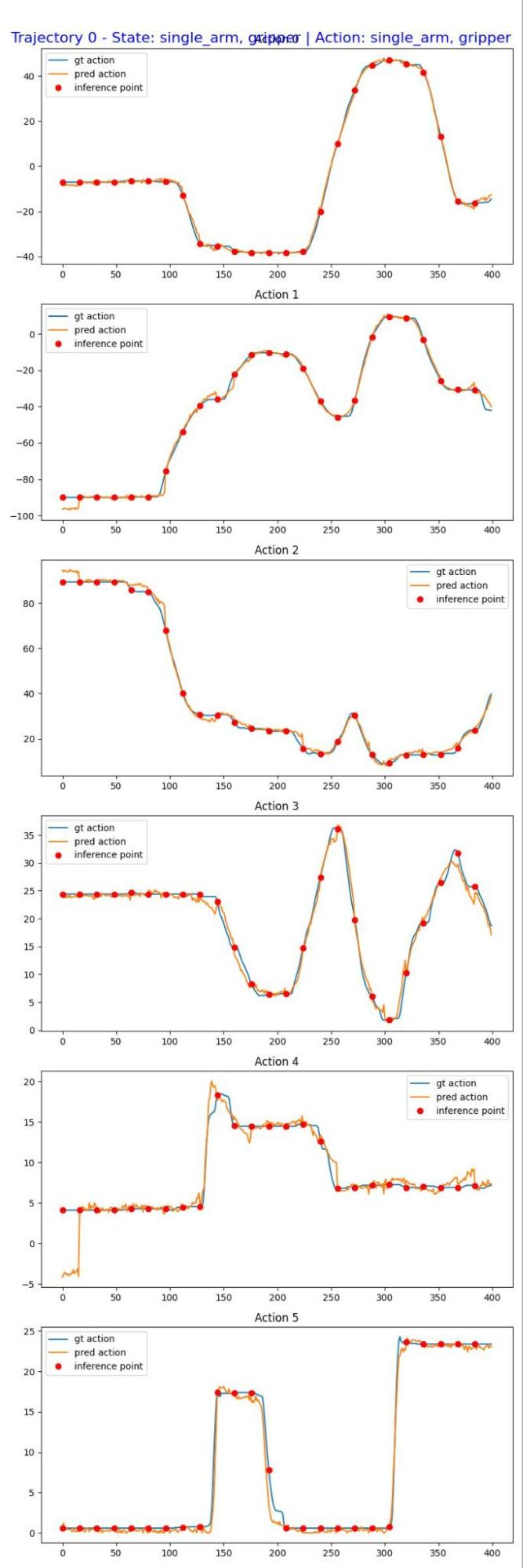
评估结果示例
评估将生成可视化结果,用于比较预测动作与真实轨迹: